この記事ではVue.jsで基本的なSPA(Single Page Application)を作成する方法を紹介します。
- create-vueを使用
- Vue3でComposition APIを使用
- データはLocalStorageに保存
- PiniaやVue Routerは使用しない
1. 実行環境
- macOS:13.1
- Node.js:18.12.1
- npm:8.19.2
- Vue:3.2.45
- create-vue:3.5.0
- Vite:4.0.4
2. アプリの要件
以下の機能を持つメモアプリを作成します。
- 一覧
- メモの1行目を一覧表示する。タイトルをクリックするとそのメモの編集状態に移行する。
- 詳細
- 編集状態 = 詳細
- 追加
- 新規作成ボタンをクリックすると新規メモが作成され、編集状態に移行する。
- 編集
- テキストエリアにメモの内容を表示し、編集できる。編集ボタンをクリックすると保存される。
- 削除
- 編集状態で削除ボタンをクリックするとメモは削除される。
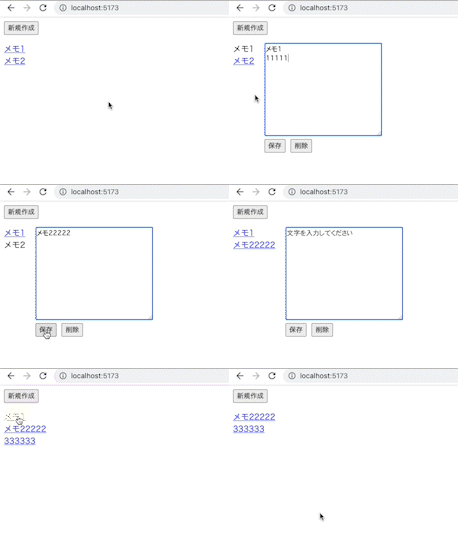
3. 作成手順
3-1. create-vueを実行
$ npm create vue@3

Vue.js - The Progressive JavaScript Framework

✔ Project name: … vue-project
✔ Add TypeScript? … No
✔ Add JSX Support? … No
✔ Add Vue Router for Single Page Application development? … No
✔ Add Pinia for state management? … No
✔ Add Vitest for Unit Testing? … No
✔ Add an End-to-End Testing Solution? › No
✔ Add ESLint for code quality? … Yes
✔ Add Prettier for code formatting? … Yes
ESLintとPrettier以外全部No
$ cd vue-project
$ git init
$ npm install
$ npm run dev
git initは任意のタイミングでnpm run dev実行後、ブラウザからhttp://localhost:5173/にアクセスして確認。
3-2. 不要なファイルとコードを削除
以下のファイルを削除します。
src/assets/*src/components/*
以下のファイルを編集します。
src/main.js
import { createApp } from "vue";
import App from "./App.vue";

createApp(App).mount("#app");
src/App.vue
<script setup></script>

<template>
  <h1>Hello World!</h1>
</template>

<style scoped></style>
3-3. メモのCRUDを実装
src/App.vue
<script setup>
import { ref } from "vue";

const memos = ref([]);
const editingMemo = ref();

function createMemo() {
  const memo = { id: Date.now(), content: "" };
  editMemo(memo);
}

function editMemo(memo) {
  editingMemo.value = { id: memo.id, content: memo.content };
}

function doneEdit() {
  editingMemo.value.content = editingMemo.value.content.trim();
  if (!editingMemo.value.content) {
    removeMemo();
  } else {
    const memo = memos.value.find((memo) => memo.id === editingMemo.value.id);
    if (memo) {
      memo.content = editingMemo.value.content;
    } else {
      memos.value.push(editingMemo.value);
    }
    editingMemo.value = null;
  }
}

function removeMemo() {
  memos.value = memos.value.filter((memo) => memo.id !== editingMemo.value.id);
  editingMemo.value = null;
}

function getFirstLine(text) {
  return text.split(/\n/)[0];
}
</script>

<template>
  <form @submit.prevent="createMemo">
    <button>新規作成</button>
  </form>
  <div class="main">
    <ul>
      <li v-for="memo in memos" :key="memo.id">
        <a
          @click.prevent="editMemo(memo)"
          href="#"
          :class="memo.id === editingMemo?.id ? 'selected' : ''"
        >
          {{ getFirstLine(memo.content) }}
        </a>
      </li>
    </ul>
    <div v-if="editingMemo">
      <textarea v-model="editingMemo.content"></textarea>
      <div>
        <button @click="doneEdit">保存</button>
        <button @click="removeMemo">削除</button>
      </div>
    </div>
  </div>
</template>

<style scoped>
.main {
  display: flex;
}
.main ul {
  padding-left: 0px;
  padding-right: 20px;
  margin: 0;
}
button {
  cursor: pointer;
}
form {
  margin-bottom: 1em;
}
.selected {
  color: inherit;
  text-decoration: none;
  pointer-events: none;
}
</style>
editMemo()でeditingMemo.value = memoとしてしまうと、編集中のメモが同期的に一覧表示されているメモに反映されてしまう:class="memo.id === editingMemo?.id ? 'selected' : ''"
3-4. メモをlocalStrageに保存
src/App.vue
  <script setup>
  import { ref } from "vue";

+ const STORAGE_KEY = "vue-memoapp";
+ const memos = ref(JSON.parse(localStorage.getItem(STORAGE_KEY) || "[]"));
  const editingMemo = ref();

  //省略

  function doneEdit() {
    editingMemo.value.content = editingMemo.value.content.trim();
    if (!editingMemo.value.content) {
      removeMemo();
    } else {
      const memo = memos.value.find((memo) => memo.id === editingMemo.value.id);
      if (memo) {
        memo.content = editingMemo.value.content;
      } else {
        memos.value.push(editingMemo.value);
      }
+     localStorage.setItem(STORAGE_KEY, JSON.stringify(memos.value));
      editingMemo.value = null;
    }
  }

  function removeMemo() {
    memos.value = memos.value.filter((memo) => memo.id !== editingMemo.value.id);
+   localStorage.setItem(STORAGE_KEY, JSON.stringify(memos.value));
    editingMemo.value = null;
  }

  //省略
  </script>

  //省略
3-5. メモの編集フォームをコンポーネント化
src/App.vue
  <script setup>
  import { ref } from "vue";
+ import MemoForm from "./components/MemoForm.vue";
  //省略
  </script>

  <template>
    <form @submit.prevent="createMemo">
      <button>新規作成</button>
    </form>
    <div class="main">
      //省略
+     <MemoForm
+       v-if="editingMemo"
+       v-model:content="editingMemo.content"
+       @save="doneEdit"
+       @remove="removeMemo"
+     >
+     </MemoForm>
    </div>
  </template>
  //省略
src/components/MemoForm.vue
<script setup>
defineProps({ content: String });
defineEmits(["update:content", "save", "remove"]);
</script>

<template>
  <div>
    <textarea
      :value="content"
      @input="$emit('update:content', $event.target.value)"
    ></textarea>
    <div>
      <button @click="$emit('save')">保存</button>
      <button @click="$emit('remove')">削除</button>
    </div>
  </div>
</template>

<style scoped>
button {
  margin-right: 10px;
  cursor: pointer;
}
</style>
3-6. メモの編集フォームを修正
src/components/MemoForm.vue
  <script setup>
+ import { ref, onMounted, onUpdated } from "vue";
+
  defineProps({ content: String });
  defineEmits(["update:content", "save", "remove"]);
+
+ const textarea = ref(null);
+
+ onMounted(() => {
+   textarea.value.focus();
+ });
+
+ onUpdated(() => {
+   textarea.value.focus();
+ });
  </script>

  <template>
    <div>
      <textarea
+       cols="30"
+       rows="10"
        :value="content"
        @input="$emit('update:content', $event.target.value)"
+       ref="textarea"
+       placeholder="文字を入力してください"
      ></textarea>
      <div>
        <button @click="$emit('save')">保存</button>
        <button @click="$emit('remove')">削除</button>
      </div>
    </div>
  </template>

  <style scoped>
  button {
    margin-right: 10px;
    cursor: pointer;
  }
  </style>
- テンプレート参照 | Vue.js
- ライフサイクルフック | Vue.js
onMounted(() => { textarea.value.focus(); });でメモの編集フォーム表示時に自動フォーカスonUpdated(() => { textarea.value.focus(); });でメモの編集中に他のメモを選択した時にも自動フォーカス
【参考】